

Hiding Sensitive Values in Event Data
Block outputs may contain sensitive data such as API keys, passwords, or personally identifiable information. Sensitive paths let you specify which fields in a block’s output should be redacted, replacing their values with ****** in the event viewer and API responses.
How Redaction Works
Section titled “How Redaction Works”Each block output can have a list of JSONPath expressions that identify sensitive fields. When a block produces an event, the system evaluates these paths against the output data and marks matching values as sensitive. Those values are then replaced with ****** whenever the event is displayed in the UI or returned through the API.
Downstream blocks still receive the actual unredacted values for processing. Redaction only affects how the data is displayed.
Example: A block outputs the following data with $.password configured as a sensitive path:
{ "username": "alice", "password": "s3cret!"}In the event viewer:
{ "username": "alice", "password": "******"}Configuring Sensitive Paths
Section titled “Configuring Sensitive Paths”To add sensitive paths to a block output:
- Select the block on the canvas to open its sidebar
- Navigate to the block’s output section
- Expand the Sensitive paths card
- Click Add path and enter a JSONPath expression (e.g.
$.password) - Click outside the input or press Tab to save — changes apply automatically
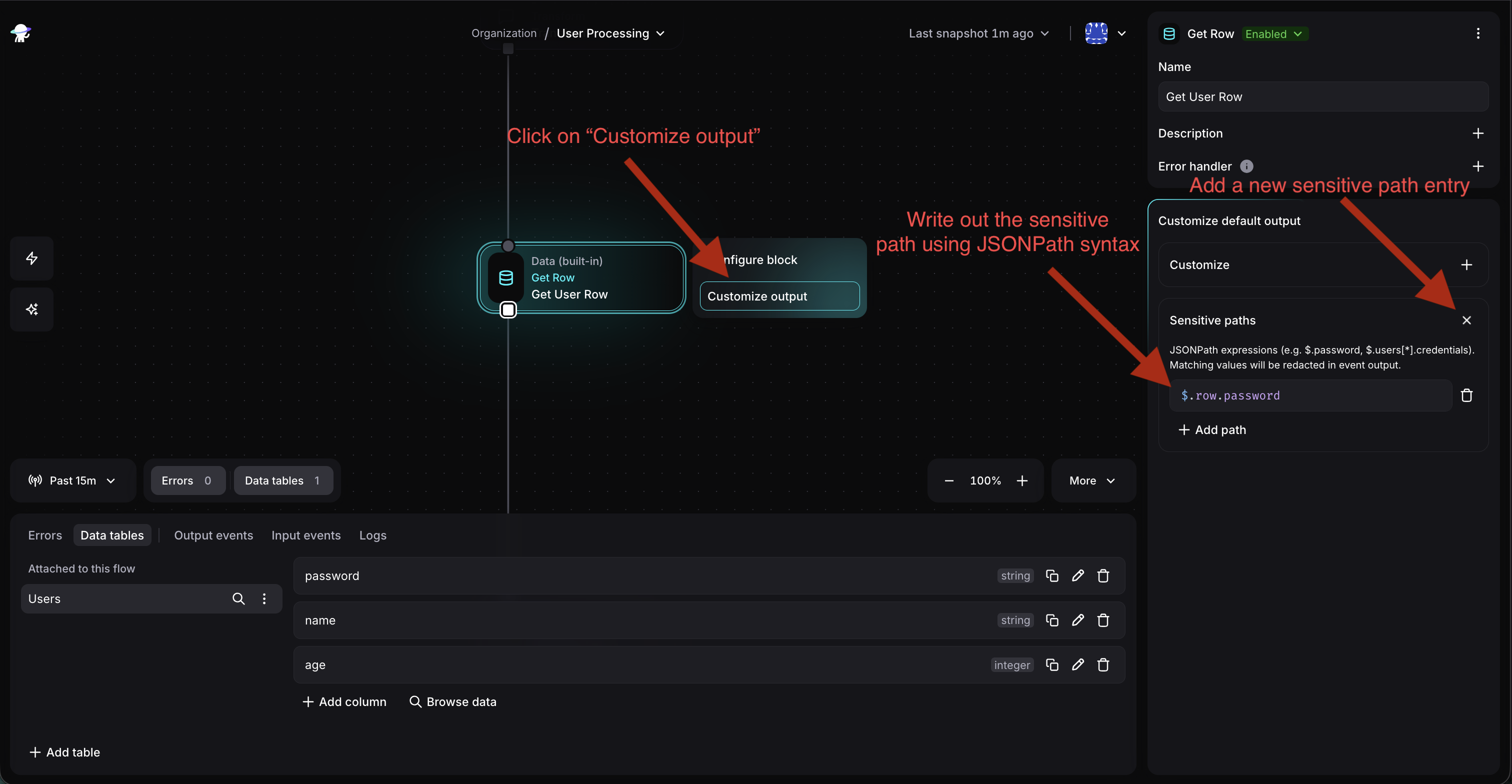
To remove a path, click the trash icon next to it. Closing the Sensitive paths card clears all configured paths.
JSONPath Syntax
Section titled “JSONPath Syntax”Sensitive paths use JSONPath expressions starting with $ (the root of the block’s output). Here are the most common patterns:
| Expression | Matches |
|---|---|
$.password |
A top-level field |
$.credentials.token |
A nested field |
$.users[*].ssn |
A field in every array element |
$.tokens[*] |
Every element of an array |
$ |
The entire output |
Expressions support wildcards ([*]) for arrays and can be chained to arbitrary depth (e.g. $.data.users[*].credentials.apiKey). The full syntax is specified here.
Examples
Section titled “Examples”Redacting a field from an API response
Section titled “Redacting a field from an API response”A block calls an external API and returns connection details:
{ "host": "db.example.com", "port": 5432, "username": "app_user", "password": "xK9#mP2$vL"}Sensitive path: $.password
Result in event viewer:
{ "host": "db.example.com", "port": 5432, "username": "app_user", "password": "******"}Redacting PII from an array of records
Section titled “Redacting PII from an array of records”A block queries a list of users:
{ "users": [ { "name": "Alice", "email": "alice@example.com", "ssn": "123-45-6789" }, { "name": "Bob", "email": "bob@example.com", "ssn": "987-65-4321" } ]}Sensitive path: $.users[*].ssn
Result in event viewer:
{ "users": [ { "name": "Alice", "email": "alice@example.com", "ssn": "******" }, { "name": "Bob", "email": "bob@example.com", "ssn": "******" } ]}Multiple sensitive paths can be combined — for example, adding both $.users[*].ssn and $.users[*].email redacts both fields.
App-Defined Sensitive Fields
Section titled “App-Defined Sensitive Fields”App developers can mark fields as sensitive directly in the output schema by setting "sensitive": true on a property. When a block with such a schema produces events, the matching paths are automatically configured — no manual setup is needed.
This is useful for apps that inherently deal with sensitive data, such as credential managers or authentication providers. See the Configuration documentation for details on declaring sensitive fields in app definitions.
Important Behavior
Section titled “Important Behavior”- Redaction is display-level only. Downstream blocks receive actual values through the
outputsvariable. Sensitive paths control what is visible in the event viewer and API, not what flows through the automation. - Non-matching paths are ignored. If a JSONPath expression doesn’t match any field in the output (e.g. the field doesn’t exist or the structure differs), it is silently skipped. No errors are raised.
- Applied after output customization. If a block has a Customize expression on its output, sensitive paths are evaluated against the transformed data, not the original. Make sure your JSONPath expressions match the structure produced by the customization.
- Parent paths cover children. Marking
$.credentialsas sensitive redacts the entire object, including all nested fields. There is no need to also mark$.credentials.passwordseparately. - Sensitive paths vs Secrets. Secrets protect values used in configuration expressions (API tokens, signing keys). Sensitive paths protect values that appear in block output event data. Use both when appropriate.