

Secrets
Secrets provide secure storage for sensitive data such as API tokens, credentials, and signing keys. Each project includes a dedicated Secrets section where you can store and reference confidential information without exposing it directly in flow configurations.
Overview
Section titled “Overview”Secrets are stored at the project level and can be referenced in:
- App installation configurations
- Block configuration expressions
- Any JavaScript expression within your flows
Once stored, secrets are never exposed in plain text within the flow editor or logs. They are securely injected at runtime when referenced.
Managing Secrets
Section titled “Managing Secrets”Creating a Secret
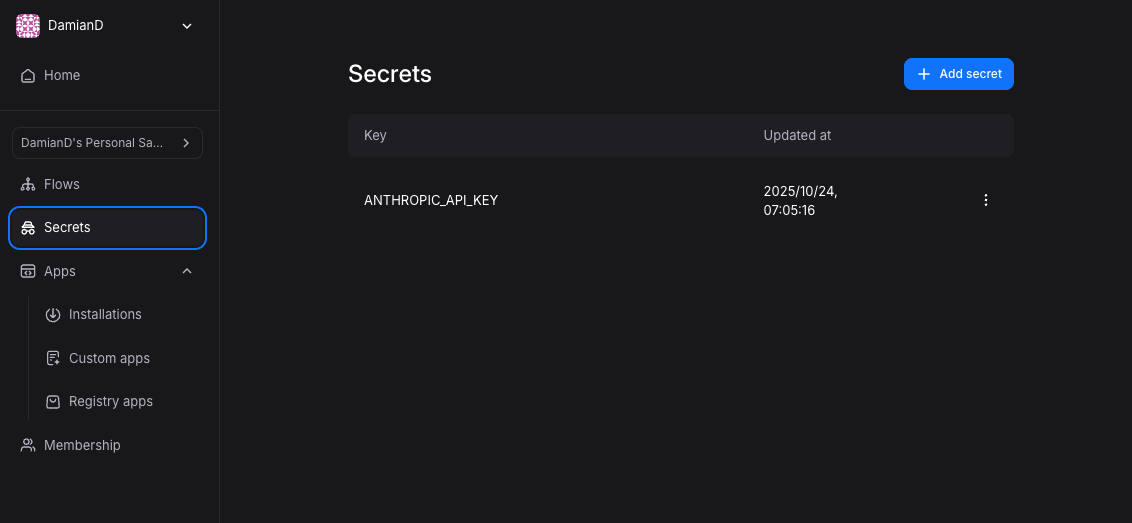
Section titled “Creating a Secret”To create a new secret:
- Navigate to your project
- Click the Secrets tab in the left sidebar
- Click Add secret in the top-right corner
- Enter a key (e.g.,
ANTHROPIC_API_KEY,DEMO_BOT_SLACK_BOT_TOKEN) - Enter the secret value
- Click Save
Referencing Secrets
Section titled “Referencing Secrets”Secrets are referenced using the secrets object within JavaScript expressions. The syntax follows this pattern:
secrets.SECRET_KEY_NAME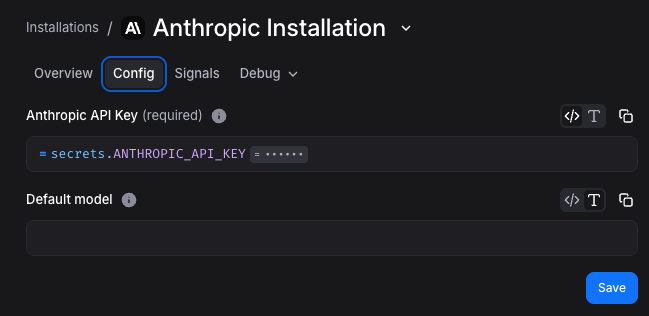
In App Installation Configurations
Section titled “In App Installation Configurations”When configuring an app installation, reference secrets directly in configuration fields:
secrets.DEMO_BOT_SLACK_BOT_TOKENsecrets.DEMO_BOT_SLACK_SIGNING_SECRETIn Block Configuration Expressions
Section titled “In Block Configuration Expressions”Secrets can be referenced in any block configuration expression:
// HTTP Request header{  "Authorization": `Bearer ${secrets.ANTHROPIC_API_KEY}`}
// Dynamic API endpoint with secret token`https://api.example.com/data?token=${secrets.API_TOKEN}`
Security Considerations
Section titled “Security Considerations”Secret Visibility
Section titled “Secret Visibility”Secrets are scoped to the project level. All users with access to the project can:
- View secret keys (names)
- Reference secrets in configurations
- Update or delete secrets
Secret values are never displayed in plain text after creation.
Secrets in Logs
Section titled “Secrets in Logs”When a block or app installation uses a secret, the secret value is not exposed in:
- Flow execution logs
- Debug output
- Error messages
- Event inspection views
If a secret value appears in an API response or block output, it will be visible in subsequent block configurations that reference that output.