

API Keys and OAuth2
Whenever you want to access Flows in a way different from the web interface, e.g.
- using a Flow MCP server via an AI Assistant,
- calling Flow HTTP endpoints programmatically,
- using flowctl, the Flows CLI tool,
- or using the Flows TF Provider,
you will need to authenticate using either an API Key or OAuth2.
You can see more on creating API Keys in API Keys, while you will be prompted to authenticate via OAuth2 when using tools that support it.
In both those cases you will end up with so-called Authorizatons. You can find these by clicking your avatar in the upper-left corner, then selecting “Settings”, and clicking the “Authorizations” tab in the left sidebar. There’s a separate page for API Key authorizations and one for OAuth2 authorizations.
Their access levels are managed the same way.
Authorizations
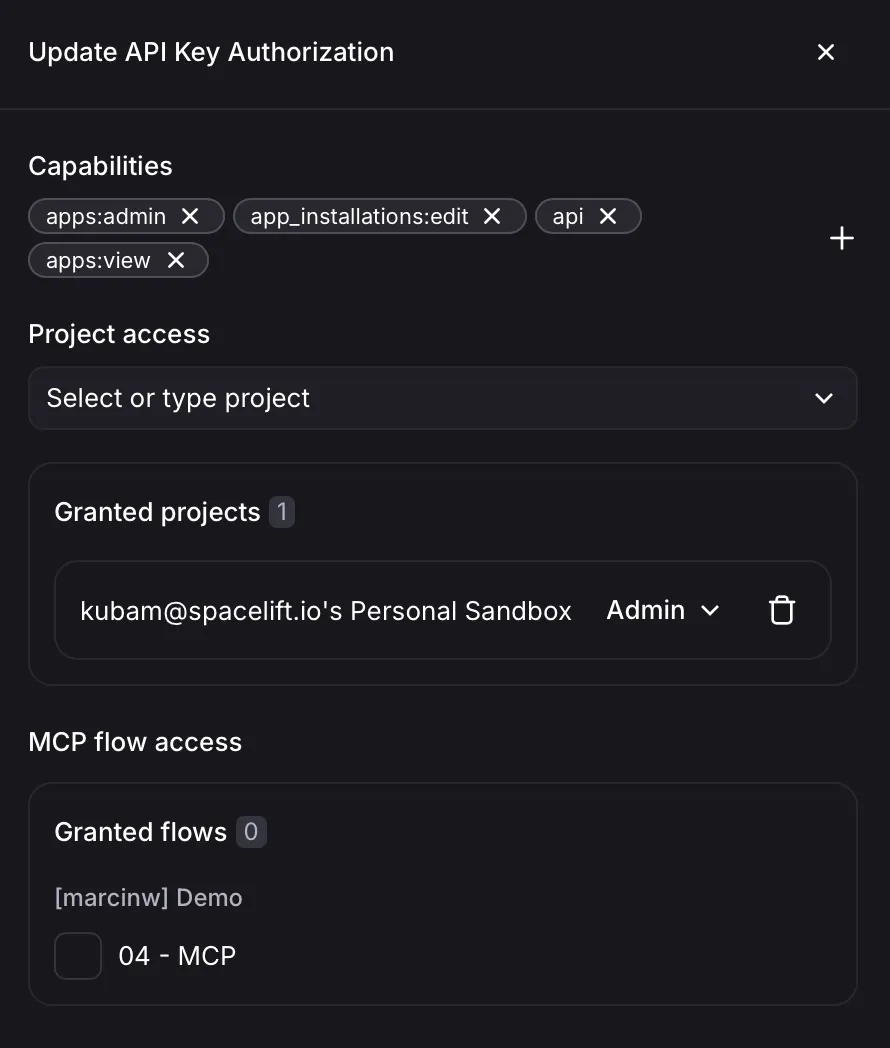
Section titled “Authorizations”An authorization represents a set of access rights delegated from a Flows user to an external tool or service. Authorization access is very granular, so you are able to grant only the necessary permissions. You can also always go back to the authorizations page and modify or revoke any authorization.
Access is managed through 3 different mechanisms:
- Capabilities - what kinds of operations is the authorization allowed to perform
- Project Access - which projects is the authorization allowed to access
- MCP Flow Access - which Flow MCP Servers is the authorization allowed to access
It’s worth noting that all this is bounded by your own permissions. If you lose access to a project, your authorizations won’t have access to it anymore either.
Capabilities
Section titled “Capabilities”Capabilities specify what kinds of operations the authorization is allowed to perform.
mcp- allows access to Flow MCP serversapi- allows access to the Flows API, required for both CLI and TF Provider accessapps:view- allows viewing appsapps:admin- allows managing custom appsflows:edit- allows creating and modifying Flowssecrets:edit- allows managing secretsendpoints:access- allows accessing Flow HTTP endpoints on behalf of the user
Project Access
Section titled “Project Access”In the project access section, you have to explicitly select which projects the authorization should have access to, and at what level. The available roles are the same as for regular users.
MCP Flow Access
Section titled “MCP Flow Access”Finally, in order for an authorization to access Flow MCP servers, you have to explicitly select which MCP servers it should have access to.