

HTTP Blocks
HTTP blocks handle web-based integrations, allowing flows to receive incoming requests and make outgoing HTTP calls.
HTTP Endpoint Block
Section titled “HTTP Endpoint Block”Creates webhook endpoints that external services can call or users can open in their browsers to trigger your flow. Each flow gets its own subdomain, and each endpoint can be configured with its own path within that subdomain. Multiple endpoints can handle different HTTP methods.
Each HTTP Endpoint generates a unique URL like https://agitated-cattle-xvud.endpoints.{appDomain}/your_path. All endpoints within the same flow share the same subdomain, but each endpoint can have its own path configuration.
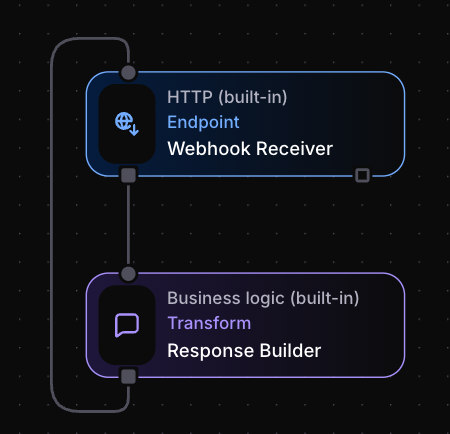
HTTP Endpoints handle bidirectional communication. They receive incoming requests on their output socket and send responses back through their “default” input socket. This pattern lets you process the incoming request through other blocks in your flow before sending a response back to the original caller.
Configuration
Section titled “Configuration”URL path with optional parameters:
/webhook- Simple static path/users/{userId}/events/{eventId}- Path with parameters
Parameters become available in output event data.
Methods
Section titled “Methods”HTTP methods this endpoint accepts:
["GET", "POST"]- Multiple methods["POST"]- Single method (typical for webhooks)
Audience
Section titled “Audience”Controls endpoint access:
World- Publicly accessible (no authentication)Organization- Organization members onlyProject- Project members only
Header Expressions
Section titled “Header Expressions”Example response headers:
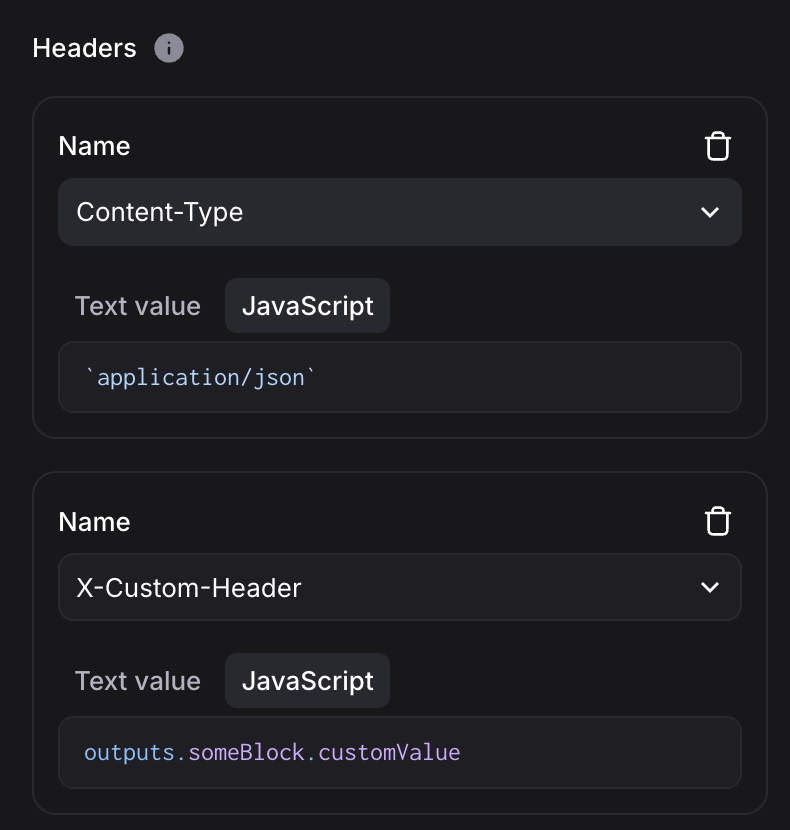
Response content sent back to caller.
Status Code
Section titled “Status Code”HTTP response status code (e.g., 200 for success, 404 for not found).
Usage Pattern
Section titled “Usage Pattern”HTTP Endpoint requires specific pattern for request-response handling:
- Incoming Request: External service calls endpoint URL
- Event Generation: HTTP Endpoint emits event with request data (headers, body, parameters)
- Processing: Flow processes request through connected blocks
- Response: Send event back to HTTP Endpoint’s default input to respond
HTTP Request Block
Section titled “HTTP Request Block”Makes outgoing HTTP calls to external services and APIs. Use for integrating with REST APIs, fetching data, or triggering actions in other systems.
Configuration
Section titled “Configuration”URL Expression
Section titled “URL Expression”Target URL for the request:
// Static URL"https://api.example.com/users"
// Dynamic URL using input data`https://api.example.com/users/${outputs.getUserId.userId}`
// Template URL`https://api.github.com/repos/${outputs.config.repo}/issues`
HTTP Method
Section titled “HTTP Method”Request method:
GET- Data retrievalPOST- Data submission
Body Expression
Section titled “Body Expression”Request body content:
outputs.otherBlock.valueIf expression returns a string, it’s used as-is as the body. If it returns anything else, it’s automatically json-encoded.
Header Expressions
Section titled “Header Expressions”Example response headers: