

AI Blocks
AI blocks enable you to build Model Context Protocol (MCP) servers, allowing your flows to act as tools that AI agents and LLMs can invoke.
MCP Tool Block
Section titled “MCP Tool Block”The MCP Tool block transforms your flow into an MCP server with custom tools for AI agents to use. Each MCP Tool block represents one tool in your MCP server.
How MCP Tool Blocks Work
Section titled “How MCP Tool Blocks Work”When you create an MCP Tool block:
- Tool Registration: Block automatically registers as available tool in MCP server
- Agent Invocation: AI agents discover and invoke your tool with specific arguments
- Event Generation: Each invocation generates an event with the agent’s request
- Response Handling: Your flow processes the request and sends response back to block’s input
Using Your MCP Server
Section titled “Using Your MCP Server”Once you have MCP Tool blocks in your flow, your flow becomes an MCP server that AI agents can connect to. When no blocks are selected on the canvas, the MCP server address is displayed in the right sidebar. Copy this address and use it to configure AI agents or MCP clients so they can discover and invoke the tools you’ve created.
The MCP server automatically includes all MCP Tool blocks from your flow as available tools.
Configuration
Section titled “Configuration”Input Schema
Section titled “Input Schema”Define the arguments your tool accepts. The schema specifies what parameters AI agents can pass to your tool when invoking it.
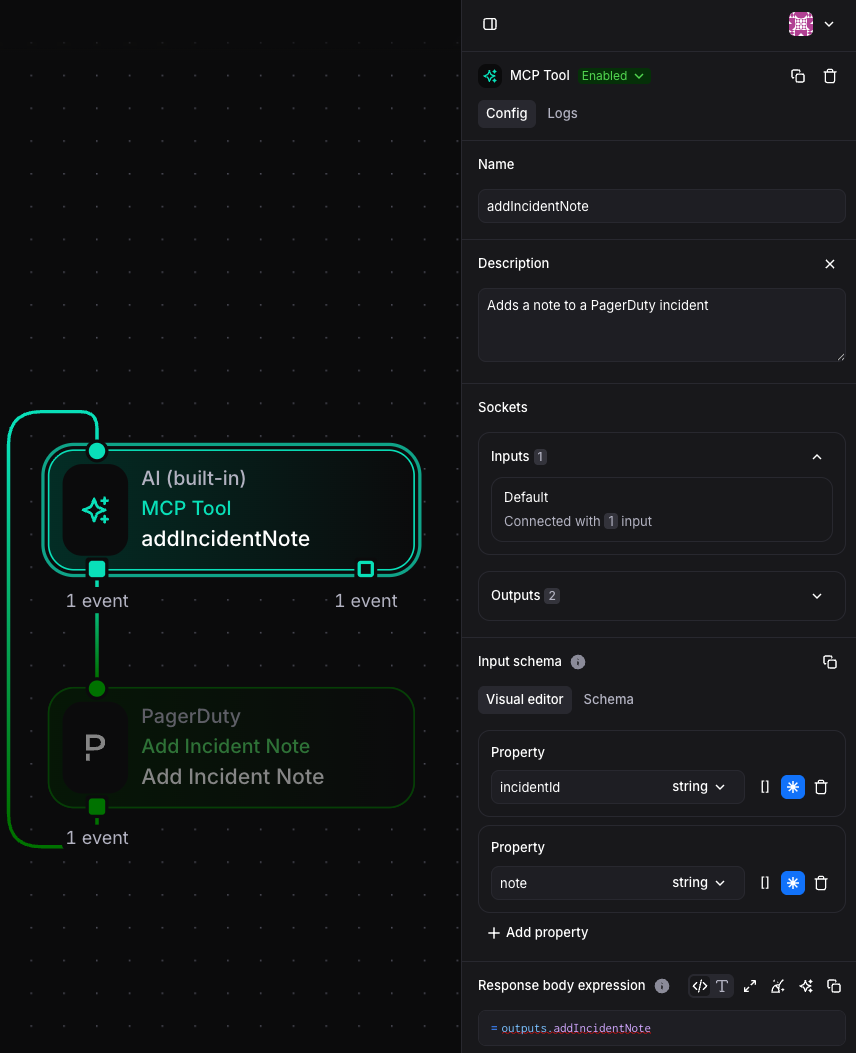
Response Body Expression
Section titled “Response Body Expression”Configure how your tool responds to invocations:
// Simple text response`The weather in ${outputs.weatherApi.location} is ${outputs.weatherApi.temperature}°${outputs.weatherApi.units}`
// JSON response{  location: outputs.weatherApi.location,  temperature: outputs.weatherApi.temperature,  conditions: outputs.weatherApi.conditions,  timestamp: new Date().toISOString()}
Event Structure
Section titled “Event Structure”When an AI agent invokes your MCP tool, the block generates an event:
{ "arguments": { "incidentId": "Q2ZRSMVNLPVSKX", "note": "note from claude" }, "user": { "email": "damiand@spacelift.io", "role": "admin" }}Building MCP Tool Flows
Section titled “Building MCP Tool Flows”Simple Response Pattern
Section titled “Simple Response Pattern”For tools that respond immediately:
- Create MCP Tool block
- Connect its output directly to its input
- Configure Response Body Expression to return desired response
Processing Pattern
Section titled “Processing Pattern”For tools requiring data processing:
- Create MCP Tool block
- Connect output to processing blocks (HTTP Request, Transform, App blocks)
- Connect final processing block back to MCP Tool input
- Configure Response Body Expression based on processed data
Example: Weather Lookup Tool
Section titled “Example: Weather Lookup Tool”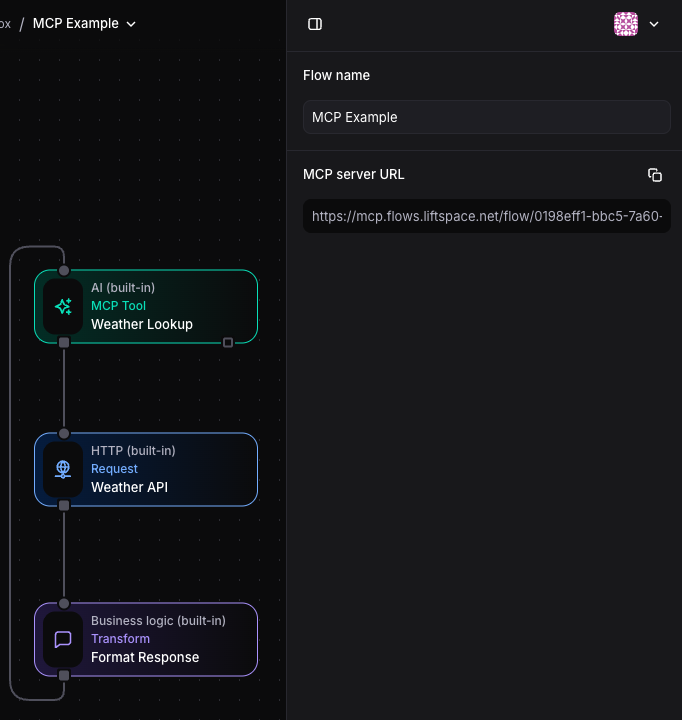
MCP Tool Configuration:
- Input Schema: Location (required), units (optional)
- Response Body:
outputs.formatResponse.weatherDescription
HTTP Request Configuration:
- URL:
https://api.weather.com/v1/current?location=${outputs.weatherLookup.arguments.location}
Common Use Cases
Section titled “Common Use Cases”- Data Retrieval Tools: Fetch information from internal systems
- Action Execution Tools: Perform operations like creating tickets, sending messages
- Workflow Triggers: Allow AI agents to initiate complex automation workflows